Latest Updates

Showing posts with label tech. Show all posts

WANT TO HIDE YOUR APPS IN YOUR PHONE? WELL FIND OUT HOW HERE!

June 20, 2021
•


Hello there, I will be showing you how to hide your apps for specifc phones. Why this you say? well, with the incessant robbing, extortion by police officers, kidbappings and forcefull removal of money from ones banks, it has only become paramount to take basice security measures to help protect oneself from the current state we have found the country Nigeria in. 

For this post, I wil show you how to hide apps for few popular phones.

ASUS: I am starting with this phone because it is what I use. The Asus phone is very easy to hide Apps on. All you have to do is click on the Home button, at the top right corner of the screen you will notice vertical dotted lines. Click on those lines, click on preference from the menu that appears then click on hide apps. From there you can select the apps you want to hide. 


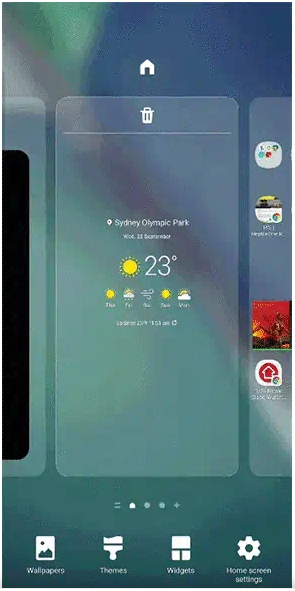
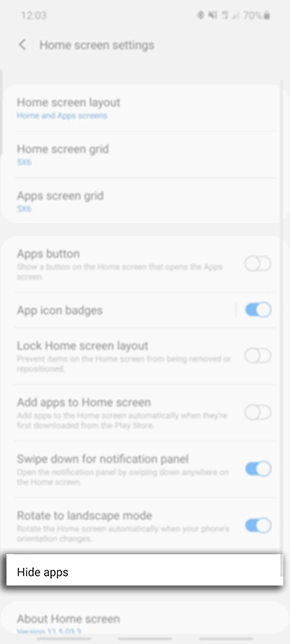
Samsung phone: To hide apps on Samsung phones is very easy. All you have to do is pinch the home screen, an option saying home screen settings will show. Click on it. From the list of menu items that shows, click on the Hide apps item. This opens a new window were you can select the apps you want to hide. Select done once you have selected the apps you want to hide.


Iphone: Press on the app you would like to hide, hold until a menu pops up. Click on the option that says "Remove App". Another menu with options will pop up, select the option to Remove from home screen. The app gets moved to App Library, but if it does not move aoutomatically, an option for you to move it to App Library would show. Kindly select that. You can alos decide to hide a full page of apps, all you have to do is tap and hold on an empty part of your screen until the apps start to jiggle, tap on the dots at the bottom of the screen, smaller versions of your screen will show up with check marks, click on the check mark.


Tecno: Tecno provides one of the best ways of hiding your apps and securing them. Almost like they know what Nigerians face.
To hide an app in a Tecno phone, Swipe up with two fingers on your home screen to show your Hide Apps Screen, click on Add/Remove and select the apps you want to hide. Now to prevent people from having access to the Hide Apps page, click on the settings Icon and click on set password, Set the password you want.


Infinix: To hide apps on Infinix phones, make sure you are using the XOS launcher as your default launcher. Navigate to the XOS launcher screen, long hold an empty section of the screen until the menu options show up. From there select the one that says Hide App ans tap on it. Select the apps you want to hide and once done, tap at the back button.


BASICS OF DATA MINING AND THE MISCONCEPTIONS SURROUNDING IT

December 13, 2019
•

Basically, there are certain misconceptions as to what Data Mining is about, some people think it is just retrieving and visualizing data, but that's untrue. Data Mining is the process of retrieving useful patterns from a large set of data, lets say Big Data see here.

These patterns are used for future projections and predictions and helps in decision making, especially in business organisations as well as for security as well. But you would ask yourself, how are these patterns arrived at in the first place? well that's a good question. In other to get these patterns, a relatively large subset of the data you are studying will be taking and studied.

These study involves using statistical and mathematical formulas to get the desired pattern you are searching for, like for instance we have the Bayes' theory which basically gives you the possibility of an event occurring based on certain events in the past and also regression analysis.

Mind you Data Mining can also be referred to as Knowledge Discovery in Database (KDD) which makes it even easier to understand the concept of Data Mining. Data Mining is part of Artificial intelligence which has being gaining a lot of talks for a long time. In other for Data Mining to be achieved, 6 phases need to be determined, first, Understand the Business, then Understand the Data available, Prepare the data, model, Evaluate your data and finally Deploy your result.

To get a better understanding of how data can be mined, try out these applications. Angoss KnowledgeSTUDIO: data mining tool, Microsoft Analysis Services: data mining software provided by Microsoft, Oracle Data Mining: data mining software by Oracle Corporation. etc.

NITTY BITS OF PROGRESSIVE WEB APPS AND WHY IT'S A BIG DEAL

November 27, 2019
•

Imagine you have a client who would want his users to access certain pages of their website without the use of the internet, peradventure some users are contractors who work at remote sites that do not have access to the internet and he definitely wants it to be a website hmm now that's a tough one or say you want to improve user experience by delivering pages faster and in so doing you want to prevent request from constantly hitting your http servers.

Well all that can be solved using PWAS. Progressive Web Apps are website that can be accessed without internet connection and can also be installed as though they are a native application on your desktop or mobile device by simply accepting a push notification sent to you.

These websites are then accessible with the help of certain technologies offline but before that can be achieved, you would have to have visited the site at least once with internet connectivity. There are various technologies that helps your website become Progressive, and we will treat them accordingly. Firstly you will need service workers.


Now let's talk a little on service workers. As a developer you might have come across service workers before, they are scripts that run at the background of your website separate from your webpages. These scripts help perform certain operations such as push notifications, background sync, caching which is used in PWAs etc.

Now let's talk about Lighthouse, an open source tool provide by Google that shows you the metrics of how "PWAish" your site is this tool helps you test if your site has fully reached a PWA acceptance level which means users would be able to access your site. Less I skip, in order to use service workers, you register it on your website by including it in your index.html file. Next thing you do is create a file which will have most of the service workers methods.

This file helps you provide the pages you would like to cache so they can work offline. Next thing you can do which is optional but also important is create a manifest.json file. For most mobile developers they will be familiar with this file. This file helps make the website downloadable, creating a setup with an icon depending on your device.

Next you can do is setup push notifications, this just helps in notifying users of your site of certain events are actions just like how you will get notified on your Twitter app that someone has liked your post. Remember push notifications is different from local notification which is dependent locally on the app if it's open. In summary, PWAs tools help you cache pages of your app so they can be served locally without always hitting back at your server.

This would help user experience as it not only serves your pages faster, but also helps your users have Access to pages in your site without connection to the internet. You can jump right in and create your first PWA app by following this link https://t.co/eFDi9K81ML?amp=1 

ARTIFICIAL INTELLIGENCE AND THE WORLD IT PROMISES

November 02, 2019
•

Artificial intelligence: The use of computers to perform complex operations that would most likely be carried out by a human through the process of learning. These programs contain algorithms that can learn from a subset of data supplied to it and make inferences from that trained data to make decisions.

Artificial intelligence has it's on subsets such as Language Processing, Image Recognition, Deep Learning, Neural networks etc. For instance, imagine a program that answers questions you ask it, it can replace the role of a customer service agent.

Funny enough a lot of those programs exist today in form of chatbots and even our Nigerian banks have started using them. The application of AI is endless, it can be used for security purposes to detect crime in form of image processing, just imagine a CCTV camera that recongise if a crime has taken place and alert the immediate authorities with out the help of any human inference.

How about we talk about language processing, where computers can understand what you say to it and perform the necessary action, Mark's Javis for instance. Amidst all these great advancements that AI has brought, a lot of people still find it a scary path to take as a lot of ethnic issues surround it one being the loss of jobs it may create in the future.

Some people believe that with the advent of AI, a lot of humans will lose their jobs as they will no longer be any need for them when a computer can perform their duties. While this might be correct, it is also false and i will explain why i said so.

Yes it's true people might lose jobs, for instance the customer service rep might loss his/her job a customer service agent, but also it's false because it won't make humans obsolete but just shift their skills into other areas.

So if the Customer Service rep lose's his/her job, they can get a new role let's say AI service supervisors, where they can help supervise and feed the AI with information it can use to create patterns to be better. Just like teaching a child. Some other people also feel AI can spell doom for the human race, while i feel this is false, i also feel it's plain hilarious because of my doubts of that happening.

I know the future Elon Musks won't sit down well with this one, but it's true. Computers are always going to be GIGO; Garbage In Garbage Out no matter how complex they want to be. Even if per say a bad scientist comes and feeds these AI with evil ideas as you may put it those ideas won't go unnoticed in the testing phases of the robot's life, like i said GIGO.

Let's say i want my robot's to do house chores, and then an "evil scientist" feeds it with information to destroy the world, dudes during the testing phase it while try to destroy the world. Some might say what if an If Else or Set Timer has being set on the program, the good news is once it deviates from it's supposed pattern, it's plugs will be pulled out after all it's a code. That's my take on AI.


HOW TO CONFIGURE YOUR PHONE FOR BROWSING

July 24, 2019
•

Ever been stuck when your phone refuses to your APN settings for you automatically? by the way, APN stands for Access Point Name. Well we at EP are you to teach you how you can configure your Access Points easily without any hassle.

Firstly all you have to do is head over to settings and click on Access Points. There you will be able to add the various settings depending on your chosen service provider or network. Below i will give out the configurations for the various APN settings for the major networks in Nigeria.

GLO: To configure your Glo line for browsing, the very first step is to decide if you want to use Glo Flat or Glo Secure. The basic difference between the two is that glo flat is the latest standard and it allows for browsing without restrictions, while glo secure enables restrictions for use on certain apps.

APN settings for Glo Flat:
Name: glo flat
APN: gloflat
Proxy: Not Set
Port: Not Set
Username: flat
Password: flat
Server: Not Set
MMSC: Not Set
MMS Proxy: Not Set
MCC: 621
MNC: 50
Authentication Type: PAP or CHAP
APN Type: default, supl
APN Protocol: IPv4

APN settings for Glo Secure:
Name: glo secure
APN: glosecure
Proxy: Not Set
Port: Not Set
Username: gprs
Password: gprs
Server: Not Set
MMSC: Not Set
MMS Proxy: Not Set
MCC: 621
MNC: 50
Authentication Type: Not Set
APN Type: default, supl
APN Protocol: IPv4

Airtel: To configure your APN settings for Airtel browsing, follow the following process.

APN settings for Airtel:
Name: Airtel NG
APN: internet.ng.airtel.com
Proxy: Not Set
Port: Not Set
Username: Not Set
Password: Not Set
Server: Not Set
MMSC: Not Set
MMS Proxy: Not Set
MCC: 621
MNC: 20
Authentication Type: PAP
APN Type: default, supl
APN Protocol: IPv4


9Mobile: To manually configure your 9mobile line, follow the following procedures.

APN settings for 9mobile:
Name: 9mobile internet
APN: 9mobile
Proxy: 010.071.170.005
Port: 8080
Username: Not Set
Password: Not Set
Server: Not Set
MMSC: Not Set
MMS Proxy: Not Set
MCC: (Keep Default)
MNC: (Keep Default)
Authentication Type: Not Set
APN Type: default
APN Protocol: IPv4


MTN: You can manually configure your MTN line by following these simple steps.

APN settings for MTN:
Name: MTN Ng
APN: web.gprs.mtnnigeria.net
Proxy: Not Set
Port: Not Set
Username: web
Password: web
Server: Not Set
MMSC: http://10.199.212.8/servlets/mms
MMS Proxy: 10.199.212.2
MMS Port: 9201
MCC: 621
MNC: 30
Authentication Type: Not Set
APN Type: default, supl,mms
APN Protocol: IPv4


BASICS OF COMPUTER NETWORKS, AND HOW YOUR PAGES ARE SERVED JUST LIKE A DRIVE THROUGH RESTAURANT

July 04, 2019
•
Illustration of a network


Computer Networking can be defined as various computers or network specific hardware that are interconnected together in other to permit the sharing of files and resources among each other. These connections are possible using wires (your Cat-5 and fibre optics ), radios,Satellites etc.

Based on whichever network topology you decide to use, these connected devices can then share resources. Common network topologies in existence include star, ring, peer to peer, hybrid, tree etc. Special protocols police the transfer of these resources from one end point to another.

For example your TCP/UDP protocols are responsible for transport, your http protocol elwhich exists at the application layer (your browser etc). In other for effective communication, your connected computers have other hardware serving as middle men for efficient transportation such as your

routers which help to detect the path a file should follow, switches which are responsible for connecting multiple computers together, your firewalls which help in filtering and security etc. Usually, if you want to connect a large network to another, switches will connect multiple end point devices and then connect to a router which serves as a gateway in which that router is then connected to another switch that has various multiple end point devices connected as well.

This is a basic illustration of how the Internet works. From its name, international network. Bet you didn't know that's the full meaning of the Internet. It's also referred to as the network of networks because of how large it is. It's the largest network in existence today.

You might wonder how does the network identify each computer from the other. Well that's where IP addresses and Mac addresses come in play. Your ip stands for Internet protocol and it's the protocol that governs identification of endpoints on the Internet. It is a unique address that is assigned to computers in a network. There are two versions, ipv4 which is currently in use and ipv6 which is going to be more used later in the future. For now, just now the difference between ipv4 and ipv6 is that IPV4 is an 8 octet 32 bit address, while IPV6 Is in hexadecimal.

Ipv4 addresses usually have 4 numbers separated by dots. The first three numbers are it's network address, and the last is its user assigned address and it's specific to a particular device. This address can be of two types, public and private addresses for now just know that private addresses are addresses that you can create while public addresses are assigned to you.

I know I am getting a little bit technical but I will stop there for now. Let's take an example. Imagine FirstLady wants to access twitter on her device What happens is that she types in https://www.twitter.com now that's what we call a domain name but usually at the logical view of that domain name is an IP address, a unique one let's say something like 192.45.23.105 which directs her device to a remote location where twitter pages exist.

Yes, this twitter you see and enjoy is just one computer with a lot of pages in a particular location. The process of transporting her request to that computer located probably in America is done using wires, radios and in some cases satellites.

Let's Say 9mobile is what FirstLady uses, 9mobile will act as the middle man, providing the infrastructure that she would need such as routers, switches, servers to locate https://twitter.com that means they are her gateway or in other words her service providers they act as a gateway to communicate with Twitter which in itself is a gateway that grants you entry to access it's pages once all security measures are passed.

Thanks for reading.

BASICS ON CLOUD COMPUTING

June 29, 2019
•
cloud computing

Basically what is cloud computing? Computers stored on a cloud in the sky? Computers that form the shape of a cloud?

Or computers that act as though they where clouds? Hmm naah ignore the name. Simply cloud computing is the process where by people or organisations store their resources (files, videos, pictures, documents) etc on remote computers located elsewhere in the world.

These computers can be located as far as America or Europe or even close by in your own country. What happens is that individuals rent space on these remote computers which are most popularly called servers in places called data centres.

Now a data centre is simply a collection of servers or as you can put it computers. After necessary payment has been made, you can now access what ever server allocated to you and start uploading your files to that remote location.

Most often than not, a unique identity is giving to your server so you can easily access it. That identity is called an ip address.

An ip address is what makes it possible for you to be able to locate a server allocated to you and send the necessary commands needed to upload your files to that server. Once your files are uploaded, you can then access those files using the same route of triggering your ip address to locate the server. That is called routing.

It's basically you taking a route mostly the fastest possible one to your server's location. These data centers help give you an administration dashboard where you can manage your resources there. You might wonder why should I store my data elsewhere when I can store it on my computer.

Well one major reason why a lot of companies are opting for cloud computing is for data security and backup. Imagine something happens to your local computer and all the resources are destroyed, that would be disastrous for your organisation.

But with cloud computing it ensures you have a backed up remote data somewhere. It also helps to enable easy file sharing. Individuals who have permission to access your data can easily do so with out having to come meet you or sticking a drive to your system etc.

The world is moving at a fast pace, and it would be no surprise that in recent years, people won't have to store things on their phones anymore but just save it on a remote location. Two major players already utilising this are Google and Apple.

Have you ever wondered how your new phone can get your pictures once you log into your Gmail account? Well that's cloud computing in power. As we draw nearer to the Internet of things days, cloud computing will most likely be a necessity.

future of cloud computing

CHIEF PRODUCT OFFICER OF FACEBOOK QUITS AFTER 13 YEARS

March 15, 2019
•

Facebook's Chief Product Officer, Chris Cox, is leaving Facebook, the giant social media company after a dedicated service that lasted up to 13 years. This development was announced by Mark Zuckerberg on Thursday. Cox’s departure comes as Facebook is preparing its purported pivot to a privacy-focused social network, and just one day after the New York Times reported a criminal investigation into Facebook’s data-sharing agreements with more than 150 companies.

 
Copyright © Entertainment Profiler. Designed by OddThemes & Best Wordpress Themes 2018